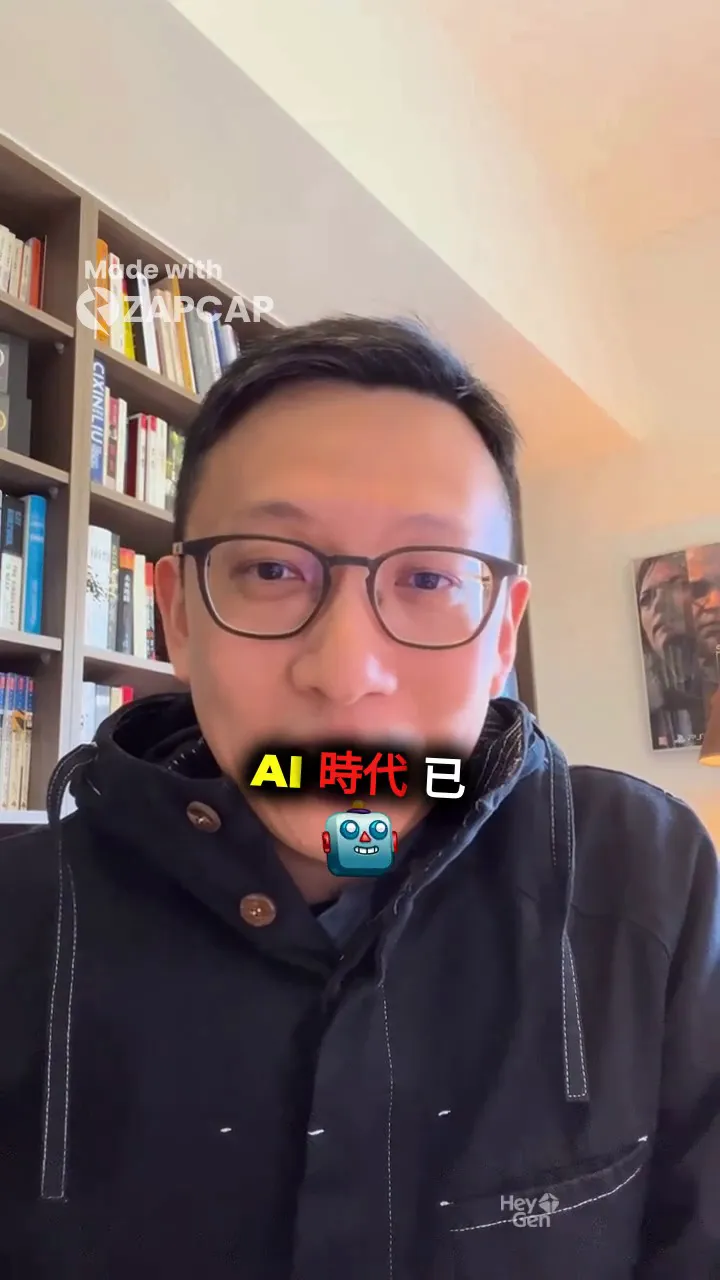

This morning I spent time integrating HeyGen (AI avatars) + ZapCap (AI subtitles) + Whisper (speech recognition) to solve several real-world problems. This post documents the complete workflow and lessons learned.
Final Result Demo
👆 AI avatar generated with HeyGen + Hormozi-style animated subtitles from ZapCap.
Table of Contents
- Why This Workflow?
- HeyGen: Generate AI Avatar Videos
- ZapCap: Auto-generate Subtitles
- Problem 1: Subtitles Blocking the Face
- Problem 2: Name Recognition Errors
- Ultimate Solution: Whisper + ZapCap Combo
- Complete Automation Script
- FAQ & Troubleshooting
Why This Workflow?
When creating short-form video content, I need:
- AI Avatar: No need to film every time - use HeyGen to generate
- Auto Subtitles: Essential for short videos, manual captioning is too slow
- Accurate Chinese Recognition: Especially for names, AI often makes mistakes
- Dynamic Effects: Hormozi-style highlighted + emoji subtitles
No single tool does it perfectly, but combined they’re powerful.
HeyGen: Generate AI Avatar Videos
Basic API Usage
curl -X POST "https://api.heygen.com/v2/video/generate" \
  -H "X-Api-Key: YOUR_API_KEY" \
  -H "Content-Type: application/json" \
  -d '{
    "video_inputs": [{
      "character": {
        "type": "avatar",
        "avatar_id": "YOUR_AVATAR_ID",
        "avatar_style": "normal"
      },
      "voice": {
        "type": "text",
        "input_text": "Your script content",
        "voice_id": "YOUR_VOICE_ID"
      }
    }],
    "dimension": {"width": 720, "height": 1280},
    "aspect_ratio": "9:16"
  }'
Recommended Settings
| Use Case | Dimension | Aspect Ratio |
|---|---|---|
| Vertical (Mobile) | 720x1280 | 9:16 |
| Horizontal (Desktop) | 1280x720 | 16:9 |
Wait for Video Completion
# After getting video_id, poll for status
curl "https://api.heygen.com/v1/video_status.get?video_id=YOUR_VIDEO_ID" \
  -H "X-Api-Key: YOUR_API_KEY"
Status changes from processing → completed, then you get video_url.
ZapCap: Auto-generate Subtitles
Why ZapCap?
- ✅ Hormozi-style subtitles (animated + highlighted)
- ✅ Auto emoji insertion
- ✅ Supports Chinese
- ✅ Complete API
Basic Workflow
# 1. Upload video
curl -X POST "https://api.zapcap.ai/videos" \
  -H "x-api-key: YOUR_API_KEY" \
  -F "file=@video.mp4"
# → Get videoId

# 2. Create subtitle task
curl -X POST "https://api.zapcap.ai/videos/{videoId}/task" \
  -H "x-api-key: YOUR_API_KEY" \
  -H "Content-Type: application/json" \
  -d '{
    "templateId": "a51c5222-47a7-4c37-b052-7b9853d66bf6",
    "autoApprove": true,
    "language": "zh"
  }'
# → Get taskId

# 3. Wait for completion, download video
curl "https://api.zapcap.ai/videos/{videoId}/task/{taskId}" \
  -H "x-api-key: YOUR_API_KEY"
# → Get downloadUrl
Popular Templates
| Template Name | Template ID | Style |
|---|---|---|
| Hormozi 1 | a51c5222-47a7-4c37-b052-7b9853d66bf6 | animated + highlighted |
| Beast | 46d20d67-255c-4c6a-b971-31fddcfea7f0 | animated + highlighted |
Problem 1: Subtitles Blocking the Face
With default settings on vertical video, subtitles appear right around the mouth area - awkward!
Solution: Adjust the top Parameter
{
  "templateId": "a51c5222-47a7-4c37-b052-7b9853d66bf6",
  "autoApprove": true,
  "language": "zh",
  "renderOptions": {
    "styleOptions": {
      "top": 75
    }
  }
}
top is the Y-axis position as a percentage (0-100). Higher values move subtitles down.
| Value | Position | Use Case |
|---|---|---|
| 30-40 | Upper | Subject in lower half |
| 50 | Middle | Default |
| 70-80 | Lower | Recommended for vertical |
Problem 2: Name Recognition Errors
ZapCap recognized “葛如鈞” (Ko Ju-Chun) as “葛如君” - a common Chinese homophone error.
Attempt 1: Edit the Transcript Directly?
ZapCap’s documentation doesn’t mention editing transcripts… but testing revealed a hidden API:
# PUT to update transcript (undocumented!)
curl -X PUT "https://api.zapcap.ai/videos/{videoId}/task/{taskId}/transcript" \
  -H "x-api-key: YOUR_API_KEY" \
  -H "Content-Type: application/json" \
  -d @fixed_transcript.json
Attempt 2: Use Whisper First
Whisper supports --initial_prompt to hint correct vocabulary:
whisper audio.m4a \
  --language zh \
  --initial_prompt "Legislator Ko Ju-Chun 葛如鈞" \
  --output_format json \
  --word_timestamps True
Result: Whisper correctly recognized “葛如鈞”!
Problem: Using Whisper Loses Emojis
ZapCap’s transcript has emoji and important fields:
{
  "text": "AI",
  "emoji": "🤖",
  "important": true
}
If we directly use Whisper’s output, these effects are lost.
Ultimate Solution: Whisper + ZapCap Combo
Core idea: Keep ZapCap’s emojis and effects, only fix the typos.
Complete Workflow
# 1. Create ZapCap task (autoApprove: false)
curl -X POST "https://api.zapcap.ai/videos/{videoId}/task" \
  -H "x-api-key: $ZAPCAP_API_KEY" \
  -d '{
    "templateId": "a51c5222-47a7-4c37-b052-7b9853d66bf6",
    "autoApprove": false,
    "language": "zh",
    "renderOptions": {"styleOptions": {"top": 75}}
  }'

# 2. Wait for transcriptionCompleted, download transcript
# → This transcript has emoji and important markers

# 3. Fix only the typos (preserve other fields)
cat transcript.json | sed 's/wrong_text/correct_text/g' > fixed.json

# 4. PUT update transcript
curl -X PUT "https://api.zapcap.ai/videos/{videoId}/task/{taskId}/transcript" \
  -H "x-api-key: $ZAPCAP_API_KEY" \
  -d @fixed.json

# 5. Approve and wait for render
curl -X POST "https://api.zapcap.ai/videos/{videoId}/task/{taskId}/approve-transcript" \
  -H "x-api-key: $ZAPCAP_API_KEY"
Result
- ✅ Correct name recognition
- ✅ All emojis preserved (🤖⏳🚀💡🏗️🧠🛡️🌐💪)
- ✅ Hormozi-style effects intact
- ✅ Subtitles positioned at bottom
Complete Automation Script
zapcap-with-fix.sh
#!/bin/bash
# Usage: ./zapcap-with-fix.sh input.mp4 "wrong_text" "correct_text"

VIDEO_FILE=$1
WRONG_TEXT=$2
CORRECT_TEXT=$3
ZAPCAP_API_KEY=${ZAPCAP_API_KEY:-"YOUR_KEY"}
TEMPLATE_ID="a51c5222-47a7-4c37-b052-7b9853d66bf6"

# 1. Upload video
echo "📤 Uploading video..."
VIDEO_ID=$(curl -s -X POST "https://api.zapcap.ai/videos" \
  -H "x-api-key: $ZAPCAP_API_KEY" \
  -F "file=@$VIDEO_FILE" | jq -r '.id')

# 2. Create task
echo "🎬 Creating subtitle task..."
TASK_ID=$(curl -s -X POST "https://api.zapcap.ai/videos/$VIDEO_ID/task" \
  -H "x-api-key: $ZAPCAP_API_KEY" \
  -H "Content-Type: application/json" \
  -d "{
    \"templateId\": \"$TEMPLATE_ID\",
    \"autoApprove\": false,
    \"language\": \"zh\",
    \"renderOptions\": {\"styleOptions\": {\"top\": 75}}
  }" | jq -r '.taskId')

# 3. Wait for transcription
echo "⏳ Waiting for transcription..."
while true; do
  STATUS=$(curl -s "https://api.zapcap.ai/videos/$VIDEO_ID/task/$TASK_ID" \
    -H "x-api-key: $ZAPCAP_API_KEY" | jq -r '.status')
  echo "   Status: $STATUS"
  [ "$STATUS" = "transcriptionCompleted" ] && break
  sleep 3
done

# 4. Download and fix transcript
echo "📝 Fixing text: $WRONG_TEXT → $CORRECT_TEXT"
TRANSCRIPT_URL=$(curl -s "https://api.zapcap.ai/videos/$VIDEO_ID/task/$TASK_ID" \
  -H "x-api-key: $ZAPCAP_API_KEY" | jq -r '.transcript')
curl -s -L "$TRANSCRIPT_URL" | sed "s/$WRONG_TEXT/$CORRECT_TEXT/g" > /tmp/fixed.json

# 5. Update transcript
curl -s -X PUT "https://api.zapcap.ai/videos/$VIDEO_ID/task/$TASK_ID/transcript" \
  -H "x-api-key: $ZAPCAP_API_KEY" \
  -H "Content-Type: application/json" \
  -d @/tmp/fixed.json > /dev/null

# 6. Approve
curl -s -X POST "https://api.zapcap.ai/videos/$VIDEO_ID/task/$TASK_ID/approve-transcript" \
  -H "x-api-key: $ZAPCAP_API_KEY"

# 7. Wait for render
echo "🎨 Rendering..."
while true; do
  RESULT=$(curl -s "https://api.zapcap.ai/videos/$VIDEO_ID/task/$TASK_ID" \
    -H "x-api-key: $ZAPCAP_API_KEY")
  STATUS=$(echo "$RESULT" | jq -r '.status')
  echo "   Status: $STATUS"
  if [ "$STATUS" = "completed" ]; then
    DOWNLOAD_URL=$(echo "$RESULT" | jq -r '.downloadUrl')
    break
  fi
  sleep 4
done

# 8. Download
OUTPUT="${VIDEO_FILE%.mp4}-subtitled.mp4"
echo "📥 Downloading to $OUTPUT"
curl -s -L "$DOWNLOAD_URL" -o "$OUTPUT"

echo "✅ Done!"
Usage
./zapcap-with-fix.sh heygen-output.mp4 "wrong_name" "correct_name"FAQ & Troubleshooting
Q1: HeyGen video has watermark?
- Free account: Always has watermark
- Paid account (Creator+): API output should be watermark-free
- Still has watermark?: Contact HeyGen support to verify API permissions
Q2: ZapCap transcription quality is poor?
Use Whisper to transcribe first, then reuse with transcriptTaskId:
{
  "templateId": "...",
  "transcriptTaskId": "previous_correct_task_id"
}
Q3: Want to customize subtitle style?
ZapCap supports full renderOptions:
{
  "renderOptions": {
    "subsOptions": {
      "emoji": true,
      "emojiAnimation": true,
      "emphasizeKeywords": true,
      "displayWords": 6
    },
    "styleOptions": {
      "top": 75,
      "fontUppercase": false,
      "fontSize": 46,
      "fontWeight": 900,
      "fontColor": "#ffffff",
      "stroke": "m",
      "strokeColor": "#000000"
    }
  }
}
Q4: LINE video sending fails?
- Ensure video is MP4 format
- Use ZapCap/HeyGen CDN URL directly (supports Range requests)
- Don’t use local ngrok URL (SimpleHTTPServer doesn’t support Range)
Summary
This workflow solves several pain points:
| Problem | Solution |
|---|---|
| AI Avatar | HeyGen API |
| Auto Subtitles | ZapCap API |
| Chinese Name Errors | Whisper prompt or sed fix |
| Subtitles Blocking Face | top: 75 |
| Preserve Emojis | Only sed fix typos |
Next steps:
- Integrate with CI/CD for automation
- Add TTS (ElevenLabs) for voice generation
- Integrate into Clawdbot for one-click generation
Questions? Leave a comment below!